Your AROS files,
on all your computers

Synchr keeps drawers on your AROS computer the same as folders on your PC, Mac, Linux machine or phone. Save a file on AROS and it is on your laptop a moment later. Change it there and the change comes back.

For ABIv11 distributions, mainline AROS on PC and the Raspberry Pi. Version 0.2, open source (MIT).

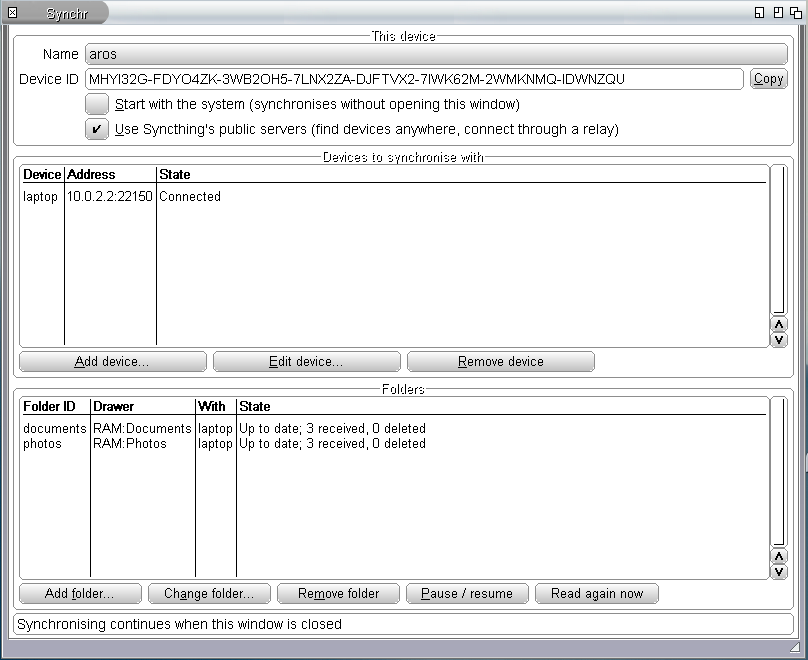
The Synchr window: this computer's name and Device ID, one device called laptop that is connected, and two folders, documents and photos, both up to date
One window for everything: your Device ID at the top, the computers you synchronise with, and the folders you share with them. Synchr 0.2 on AROS x86_64 ABIv11 under QEMU.

It works with Syncthing

Syncthing is a free, open-source program that keeps folders the same on several devices. It runs on Windows, macOS, Linux and Android. The devices talk to each other directly: your files are not stored on anyone's server, and there is no account to create.

Syncthing itself does not run on AROS. Synchr is a native AROS program that speaks Syncthing's protocol, so to your other devices your AROS computer is simply one more Syncthing device. On the other computers you keep using the ordinary Syncthing; nothing else has to be installed there.

Each device has a Device ID, a long code that it proves with its own key. You connect two devices by giving each the other's ID, and you choose which folders each one gets.

Getting started

1. Install Syncthing on your other computer or phone, if it is not there yet.

2. Start Synchr on AROS. The window shows your AROS computer's Device ID.

3. Click Add device and paste the other computer's Device ID (in Syncthing: Actions, Show ID). Syncthing asks whether to accept the new device: accept it.

4. In Syncthing, share a folder with the AROS device. In Synchr, click Add folder and choose the drawer on AROS that should hold it.

No addresses to type: Synchr finds the other computer by its Device ID.

The step-by-step guide goes through every click on both computers, and says what to do when something does not connect.
Why use it

Synchr connects AROS to the computers you already use every day.

Work on both sides

Write on AROS and keep editing on your laptop, or the other way round. New, changed and deleted files go both ways. If the same file was changed on both sides before they met, nothing is lost: the other version is kept next to it as a conflict copy.

A copy of your AROS work

Every drawer you share also lives on another computer and stays up to date as you work. A broken disk or a bad experiment on AROS no longer takes your files with it.

From your phone to AROS

Photos, music or notes from a phone that runs Syncthing reach a drawer on AROS without cables, card readers or e-mailing files to yourself.

Works across networks

The other computer does not have to be at home. Synchr finds it through Syncthing's public servers, as Syncthing does, and when a router stands in the way the connection goes through a relay.

Runs in the background

Close the window and synchronising goes on. Tick "Start with the system" and it starts with AROS, without opening the window.

No cloud, no subscription

Nothing to sign up for and nothing to pay for storage. Your files are only on your own devices.

Security and privacy

Your files travel only between devices you have added, encrypted the whole way.

Encrypted connections

Every connection uses TLS 1.3, the encryption behind secure web pages. Nobody on the network between your devices can read or change what is sent.

Only devices you added

Before any file moves, both sides check each other's Device ID against their keys. A device you have not added is refused, so someone who only knows your Device ID still gets nothing.

What the public servers see

Syncthing's discovery servers learn your Device ID and the address where your computer can be reached, so that your devices can find each other. Your files never pass through them.

Relays cannot read your files

When a relay is needed, it passes on data that is already encrypted between your two devices. It cannot see file names or contents.

Local only, if you prefer

Untick "Use Syncthing's public servers" and Synchr uses only your local network and addresses you type. No public server is contacted at all.

Your key stays with you

The files key.pem and cert.pem in the drawer Data are your computer's identity. Keep them, and do not send them to anyone; the rest of the Data drawer is settings and a log.

Good to know: deleting a file in a shared folder deletes it on the other devices too, so try Synchr with a test folder first. Files are stored on AROS as they are, without encryption on the disk. Synchr is open source, so anyone can check how it works.

Downloads

Version 0.2 is the current release. With apkg, one command installs it:

apkg install synchr

Starting it

Unpack the archive anywhere and double-click Synchr. The ReadMe in the drawer walks through connecting the first device. On the other side you need Syncthing.

What it needs

A working network connection on AROS. Choose the archive for your architecture and ABI; they are not interchangeable.

Not there yet

A folder is kept in step with one other device for now. IPv6 and automatic port opening on routers are not supported yet, so connections between different networks go through a relay. Under QEMU, use the rtl8139 network card: with e1000 the system can stop during transfers.

Support and feedback

Synchr is an independent project. If it is useful to you, you can support further work, and tell me what works, what does not and what you would like next. Both places take messages as well as support.

More programs for AROS

From the same author; most install with apkg.